- Ninja AI Tools
- Posts
- Featured Tool + Major AI News + a Tutorial You Can Use Today
Featured Tool + Major AI News + a Tutorial You Can Use Today

Brad Gaines
July 29, 2025
In partnership with


Hello AI Ninja! Here’s what’s on the agenda today…
🥷 NINJA AI TOOL: One Link, One Hub, Zero Headaches
🗞️ WHAT’S HAPPENING: Breaking AI News and Updates
💡 HIGHLIGHTS: Featured AI Tools From Recent Issues
🎓 AI TUTORIAL: How To Build a Web App Using Lovable
🔥 HOT OFF THE PRESS: Brand New AI Tool Releases
NINJA AI TOOLS
🥷 How smart creators are ditching the algorithm (and winning)
Ever feel like being an online creator means juggling 12 different tools just to stay afloat? One for your bio link, another to sell products, something else to pitch brands… it’s exhausting.
Beacons AI takes that chaos and shrinks it down into one hub where you can actually run your creator business without losing your mind.

What it actually does:
Think of Beacons as your one-stop shop for managing links, selling digital stuff, building an email list, and handling brand deals. You can spin up a customizable “link in bio” or even a mini-website in minutes—and all the tools you’d normally duct-tape together (Mailchimp, Gumroad, etc.) are already baked in.
Highlights worth knowing:
Simple drag-and-drop site builder
Sell digital products, services, or courses directly
Automated Instagram DMs to turn comments into cash
Auto-updating media kit to pitch brands
Email broadcasts and sales funnels to own your audience
Affiliate link management and real-time analytics
Fast, one-day payouts for sales
Why you’d actually use it:
Sell a downloadable guide or coaching session straight from your Instagram bio (no clunky storefront setup).
Stop relying on ever-changing social algorithms by building a real email list.
Automatically follow up with potential buyers via DMs while you sleep.
Show off your stats and media kit to brands without manually updating everything.
Who it’s really for:
If you’re a solo creator, influencer, coach, or small online business trying to grow without a tangle of different apps, this is for you.
If that sounds like a relief, you can check it out here for free—and they toss in $20 of credit for new users.
A MESSAGE FROM OUR PARTNER
Find out why 1M+ professionals read Superhuman AI daily.

In 2 years you will be working for AI
Or an AI will be working for you
Here's how you can future-proof yourself:
Join the Superhuman AI newsletter – read by 1M+ people at top companies
Master AI tools, tutorials, and news in just 3 minutes a day
Become 10X more productive using AI
Join 1,000,000+ pros at companies like Google, Meta, and Amazon that are using AI to get ahead.
WHAT’S HAPPENING
🗞️ Breaking AI News and Tool Updates
Stay current with the most important developments in AI. Every day, I break down the top headlines—along with why they matter for the future of technology, business, and society.

Tesla Strikes $16.5B Deal With Samsung for AI6 Chip Production
Why It Matters: Paves the way for smarter Teslas and robots, strengthens U.S.–South Korea tech ties, and signals a big leap in AI chip manufacturing.Google Rolls Out Conversational AI Mode in the UK
Why It Matters: Search is becoming more like a chat—making answers easier to get but worrying publishers who rely on clicks for revenue.Z.ai Launches Open‑Source GLM‑4.5 Hybrid Reasoning Model
Why It Matters: A top‑ranked, free model that blends reasoning modes and long‑context support—making powerful AI tools accessible to the world.Microsoft Introduces Experimental Copilot Mode in Edge Browser
Why It Matters: Brings an AI assistant that can juggle tabs, talk to you, and even make bookings—potentially changing how people use browsers.DeepMind Processed ~1 Quadrillion Tokens Last Month
Why It Matters: Shows just how massive AI workloads have become, hinting at huge infrastructure growth and the rising costs of advanced AI research.Anthropic Launches Autonomous AI Auditing Agents
Why It Matters: Early step toward safer AI—three specialized bots that catch hidden issues in models, though humans still need to stay in the loop.Anthropic to Impose Weekly Usage Limits on Claude Code
Why It Matters: Designed to stop nonstop use by a few heavy users, but many developers worry it’ll disrupt legitimate projects and limit productivity.Adobe Launches Generative Upscale in Photoshop
Why It Matters: Lets anyone sharpen blurry or old photos in seconds, making high‑quality image restoration accessible to everyday users.Google Chrome Adds AI-Powered Store Reviews for U.S. Users
Why It Matters: Helps shoppers instantly see a site’s trustworthiness on quality, pricing, and service—reducing the risk of bad online purchases.IMAX Partners With Runway AI to Screen AI-Generated Shorts
Why It Matters: Brings AI-made films to the big screen, giving audiences a front‑row look at how AI is reshaping creativity in cinema.
HIGHLIGHTS
💡 Featured Tools from Recent Issues
In case you missed our recent issues, here’s a quick recap of the latest AI tools we’ve highlighted.
Walter AI: → rewrite AI-generated text in a way that makes it sound natural, human, plagiarism‑free, and helps it bypass major AI detectors.
Ranked AI: → fully managed SEO (and optional PPC) service that uses AI and expert content to help businesses rank higher on Google.
Flot AI: → highlight or type text to get instant help with writing, summarizing, translating, editing, or recalling saved info wherever you work.
Bool Video: → automatically transforms product links, images, text, or static blog content into ready-to-publish promotional videos.
10Web: → quickly build, host, and manage WordPress websites—complete with design, content, performance optimization, and hosting automation.
AI TUTORIAL
🚀 Build a Web App with AI (No Code) Using Lovable
In this tutorial, you’ll learn how to build a complete web application using only natural language prompts—no coding required.
We’ll be using Lovable, a Swedish AI-powered platform launched in late 2024. Lovable introduces “Vibe Coding”—you simply describe your idea, and the AI transforms it into a working website or web app.
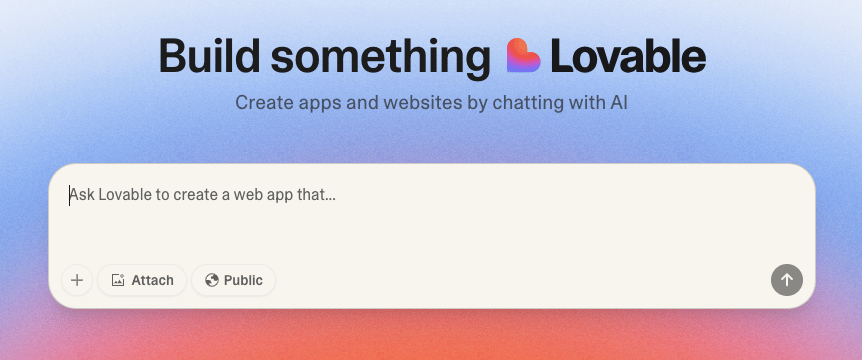
In this walkthrough, we’ll build a Lean BIM Execution Plan tool. But even if you’re not into Autodesk Revit or BIM, this tutorial is worth following—it showcases how AI can rapidly prototype applications for any industry or purpose.
Step 1: Understand Lovable
What it is: Lovable is an AI platform for building websites and web apps without coding.
How it works: Instead of writing code, you enter prompts in plain English.
When to use: Ideal for rapid prototyping before refining the app with traditional development tools.
Free plan: Includes 5 daily credits (1 prompt = 1 credit). Paid plan is $50/month for 200 credits.
Step 2: Define Your Project Goals
Open a Word or text document.
Write down:
A short summary of your project.
The features you want your web app to have.
The specific content or outputs you need.
Example (for BIM plan): Outline sections of the execution plan and required PDF output.
Tip: Don’t worry about perfect wording—you’ll refine it with AI next.
Step 3: Refine Your Prompt with ChatGPT
Copy your written goals.
Paste them into ChatGPT.
Add instructions:
Explain you’re building on Lovable.
Ask ChatGPT to research Lovable’s capabilities and improve your prompt.
Request 5 clarifying questions to ensure better project planning.
Answer the questions (e.g., “start from scratch,” “export only for now”).
Ask ChatGPT to research technical aspects, like how to best handle PDF generation.
Combine everything into a final, polished “mega prompt.”
Step 4: Build the App in Lovable
Go to Lovable
Scroll down to the prompt input field.
Paste your mega prompt and click the arrow to submit.
Wait a few minutes while Lovable builds your prototype.
Once ready:
Log in (any credentials usually work in prototype mode).
Create a new project, fill in details, and explore the generated pages.
Step 5: Refine and Customize
Remove unwanted elements:
Prompt example: “Remove the popup that says ‘Project Saved’ whenever I switch pages.”Add branding:
Upload your company logo.
Provide branding guidelines (colors, fonts).
Prompt example:
“Use the BIM Pure logo in the header, apply BIM Pure colors and Leato font, and ensure good UI/UX.”
Fix visibility issues:
If a logo is not visible, upload a colored version and prompt Lovable to use it on all pages.
Step 6: Publish the App
When you’re happy with the prototype, click Publish.
Share the link with clients, teammates, or testers.
Note: Prototypes don’t have a backend—data won’t persist if you refresh the page.
Step 7: Add a Backend (Optional)
To make your app fully functional:
Connect it to a real database (e.g., Supabase).
Add backend services for storing and managing data.
This usually requires a developer and isn’t covered in this tutorial.
📺 Want to See This Tutorial in Action?
Check out our partner BIM Pure's full video demonstration right here. Watch the process from start to finish and subscribe to their channel for more Autodesk Revit and BIM tutorials.
HOT OFF THE PRESS
🔥 Brand New Tool Releases
With hundreds of new websites and apps launching every month, we cut through the noise to bring you the most useful and innovative ones to elevate your business and everyday life.
AuthorAI: → helps writers quickly turn ideas into polished, multi-language content with AI-powered narration and formatting.
Perium: → transforms plain text prompts into polished, professional-quality visual edits—no design skills required.
Ridley: →AI-powered platform that helps homeowners create listings, price properties, and sell smarter while saving on commissions.
Mozart: → AI-powered music tool that helps musicians create melodies, loops, and full tracks from simple text prompts.
JokrBar: → adds a humorous, customizable sticky bar to your website to grab attention and engage visitors before they leave.
That’s a wrap!
Hope you’re having a great week—I’ll see ya in your inbox tomorrow at noon Eastern Standard Time (U.S.)
Brad Gaines
@NinjaAiTools
What did you think of this newsletter? |